1️⃣ systemd란?
- Linux 서비스 관리 시스템
- 서비스 시작/중지/재시작/의존성/리소스 제어 담당
- unit 파일 기반 구조
2️⃣ 사고 흐름
1. 현재 사용 중인 유닛 파일 확인
2. override 존재 여부 확인
3. 수정 방식 결정
4. 적용 후 로그 검증
3️⃣ 현재 적용 파일 확인
systemctl status nginx      # 현재 로드된 유닛 파일 경로 확인
systemctl cat nginx         # 기본 + override 전체 확인
vi /usr/lib/systemd/system/nginx.service # 수정할 파일로 이동
systemctl status nginx
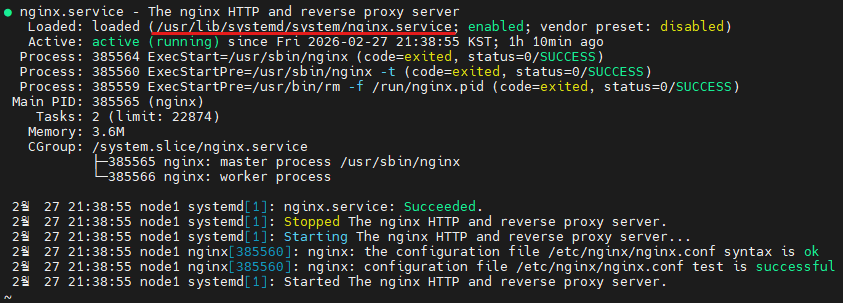
/user/lib/sysemd/system/nginx.service

4️⃣ systemd 유닛 구조 상세 설명
[Unit]
→ 서비스 설명 및 의존성

[Service]
→ 실제 실행 방법 및 옵션

[Install]
→ 부팅 시 동작 여부 (이 서비스가 어떤 target에 붙을지 정의)
5️⃣ 많이 쓰는 [Unit] 옵션
[Unit]

Description=The nginx HTTP server  # 서비스 설명 (status에 표시)

After=network-online.target        # 네트워크 완전 준비 후 시작 (순서 보장)
Wants=network-online.target        # 가능하면 네트워크 타깃도 같이 올림 (강제는 아님)

StartLimitIntervalSec=60           # 60초 동안 재시작 횟수 계산
StartLimitBurst=5                  # 60초 내 5회 초과 시 자동 재시작 중단
설명
- After → 실행 순서 제어
- Wants → 약한 의존성
- StartLimit → 재시작 폭주 방지
6️⃣ 많이 쓰는 [Service] 옵션
[Service]

Type=forking                        # 백그라운드 포크 방식 (nginx 기본)
# Type=simple                       # 포크 없이 실행 시 사용
# Type=oneshot                      # 단일 작업 스크립트용

PIDFile=/run/nginx.pid              # systemd가 추적할 PID 파일

ExecStartPre=/usr/sbin/nginx -t      # 시작 전 설정 문법 검사
ExecStart=/usr/sbin/nginx            # 실제 실행 명령
ExecReload=/bin/kill -s HUP $MAINPID # 설정 reload
ExecStop=/bin/kill -s QUIT $MAINPID  # 정상 종료

Restart=on-failure                  # 비정상 종료 시 자동 재시작
RestartSec=5                        # 재시작 전 대기 시간(초)

TimeoutStopSec=10                   # 종료 대기 시간
KillMode=mixed                      # 종료 시 그룹 제어 방식

LimitNOFILE=65535                   # 파일 디스크립터 상향(웹서버 필수)
UMask=0027                          # 기본 파일 권한

# --- 보안 옵션 --- #
NoNewPrivileges=yes                 # 권한 상승 금지
PrivateTmp=true                     # /tmp 격리
ProtectHome=yes                     # /home 접근 차단
ProtectSystem=full                  # 시스템 영역 쓰기 제한
Type 종류:
| simple | nodejs, python 앱 |
| forking | nginx, httpd |
| oneshot | 스크립트 작업 |
| notify | systemd 연동 데몬 |
| dbus | dbus 서비스 |
8️⃣ [Install] 옵션
[Install]

WantedBy=multi-user.target   # 부팅 시 자동 시작 대상
Alias=web.service            # 별칭 설정 가능
9️⃣ 변경 적용 절차
systemctl daemon-reload      # 유닛 파일 변경 반영
systemctl restart nginx      # 서비스 재시작 (stop+start)
systemctl status nginx       # 상태 확인
참고
systemctl enable nginx      # 부팅 시 자동 시작
systemctl disable nginx     # 자동 시작 해제
systemctl mask nginx        # 완전 차단 (시작 불가)
systemctl unmask nginx      # 차단 해제
🔟 로그 확인
systemctl status nginx
journalctl -u nginx -b -n 100 --no-pager  # nginx 관련 최근 로그 확인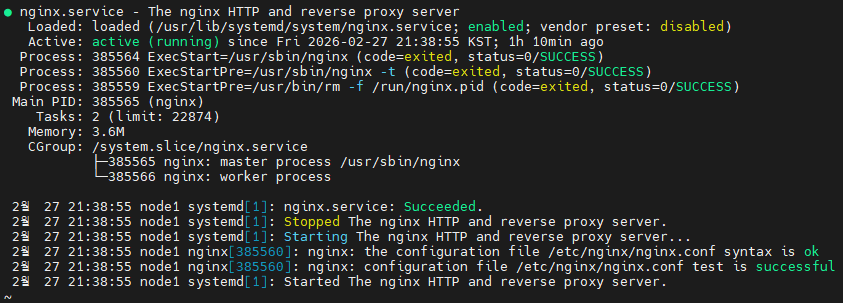
nginx.service - The nginx HTTP and reverse proxy server
→ nginx 서비스이며 HTTP 서버 및 리버스 프록시 역할을 수행하는 서비스

Loaded: loaded (/usr/lib/systemd/system/nginx.service; enabled; vendor preset: disabled)
→ 현재 사용 중인 유닛 파일은 /usr/lib/systemd/system/nginx.service이며,
  부팅 시 자동 시작(enable) 상태이고,
  OS 기본 설정은 disabled였으나 관리자가 enable한 상태라는 의미임.

Active: active (running) since Fri 2026-02-27 21:38:55 KST; 1h 10min ago
→ nginx 서비스는 현재 실행 중(active running)이며,
  2026-02-27 21:38:55부터 중단 없이 동작하여 1시간 10분이 경과했음을 의미

Process: 385564 ExecStart=/usr/sbin/nginx (code=exited, status=0/SUCCESS)
→ nginx 실행 명령이 종료코드 0으로 성공적으로 수행되었음.
  (종료코드 0은 정상 동작을 뜻한다.)

Process: 385560 ExecStartPre=/usr/sbin/nginx -t (code=exited, status=0/SUCCESS)
→ nginx 시작 전에 실행된 설정 문법 검사(nginx -t)가 성공함
  (설정 파일에 문법 오류없음 의미)

Process: 385559 ExecStartPre=/usr/bin/rm -f /run/nginx.pid (code=exited, status=0/SUCCESS)
→ 시작 전 기존 PID 파일 삭제 작업이 정상적으로 수행되었음

Main PID: 385565 (nginx)
→ 현재 systemd가 추적 중인 nginx 마스터 프로세스의 PID는 385565.

Tasks: 2 (limit: 22874)
→ 현재 nginx는 2개의 프로세스(마스터 + 워커)로 실행 중.
  (시스템이 허용하는 최대 프로세스 수는 22874)

Memory: 3.6M
→ nginx가 현재 사용 중인 메모리는 약 3.6MB.

CGroup: /system.slice/nginx.service
→ nginx.service라는 control group 아래에서 프로세스가 관리되고 있으며,
  마스터 프로세스와 워커 프로세스가 정상적으로 구성되어 실행 중.

nginx.service: Succeeded.
→ 이전 작업(예: stop)이 정상 종료되었음.

Stopped The nginx HTTP and reverse proxy server.
→ restart 과정 중 nginx가 정상적으로 중지되었음.

Starting The nginx HTTP and reverse proxy server...
→ nginx 시작 절차가 진행 중.

nginx: the configuration file /etc/nginx/nginx.conf syntax is ok
→ 설정 파일 문법이 정상임.

nginx: configuration file /etc/nginx/nginx.conf test is successful
→ 설정 파일 테스트가 성공적으로 완료되었음.

Started The nginx HTTP and reverse proxy server.
→ nginx 서비스가 정상적으로 시작되었음.
정리
- systemd는 Linux에서 서비스 실행/관리의 표준임.
- .service 유닛 파일은 [Unit], [Service], [Install] 구조로 구성됨.
- 서비스 적용 후에 검증 순서는 daemon-reload → restart → status.
'공부 ✍ > 서버 끄적✍' 카테고리의 다른 글
| ReaR기반 Linux OS 전체 백업 및 복구 (USB) (0) | 2026.03.12 |
|---|---|
| ReaR 기반 Linux OS 백업 및 복구 (NFS) (0) | 2026.03.06 |
| LifeKeeper 복제 볼륨 상태 확인 및 재동기화 (mirror_action/mirror_status) (0) | 2026.03.05 |
| LifeKeeper 자동 페일오버 방식을 수동 In-Service 정책으로 변경 (0) | 2026.03.04 |
| LifeKeeper Failover 로그 분석 (0) | 2026.03.03 |